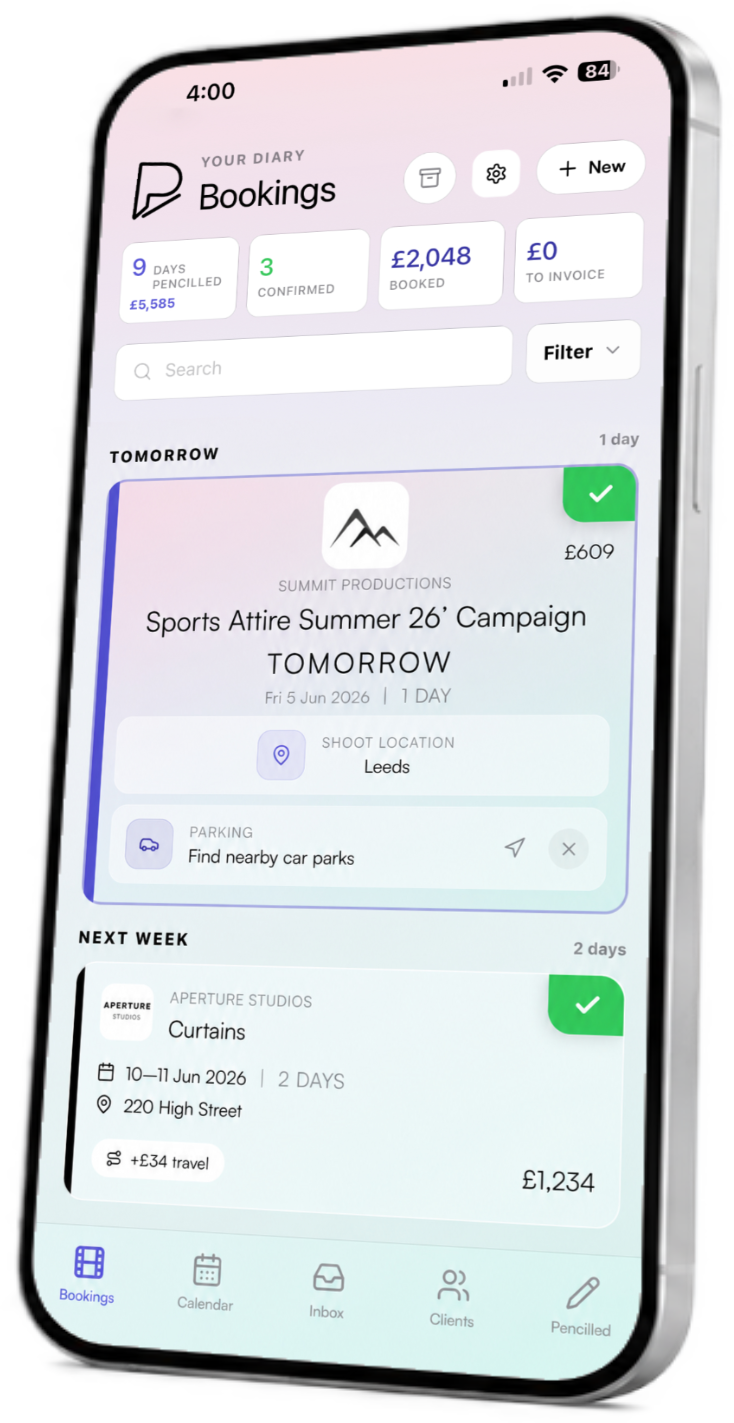
Pencilled FAQs
Answers about the booking and project management app built for freelance film and TV crew. Find out how Pencilled handles pencils, confirmed jobs, availability, Gmail, mileage, invoices, subscriptions and account privacy.
About Pencilled
What is Pencilled?
Pencilled is a booking and project management app designed specifically for freelance film and television crew. It brings your booking diary, availability, clients, project details, Gmail conversations, mileage, expenses, invoices and payment tracking together in one place.
Who is Pencilled for?
Pencilled is built for self-employed film and TV professionals who handle bookings from several producers or production companies. That includes people working across camera, sound, lighting, production, art department, locations, costume, hair and makeup, post-production and other freelance crew roles.
Is Pencilled available on iPhone and Android?
Yes. Pencilled is available for iPhone through the Apple App Store and for Android through Google Play.
How much does Pencilled Pro cost?
Pencilled Pro costs £4.99 per month or £49.99 per year. Both subscription options include one month free. The annual plan saves £9.89 compared with paying monthly for a full year.
Bookings and availability
What is a pencil booking?
A pencil is a provisional booking or hold on one or more dates. It means a producer is interested in booking you, but the job is not yet confirmed. Pencilled keeps pencils separate from confirmed work so you can see what is definite and what may still change.
Can I manage pencils and confirmed jobs in the same diary?
Yes. Pencilled shows pencilled and confirmed bookings together, with clear status information, dates, clients, locations and fees. This makes it easier to spot competing holds and understand what is happening next.
How does Pencilled help with booking clashes?
Your availability calendar gives you a single view of pencils, confirmed jobs and free dates. Instead of checking several emails and calendars, you can compare requests against the work already in your diary before replying.
Can I share my availability without exposing my private calendar?
Yes. Pencilled lets you share availability while keeping private project information out of view. Producers can see whether relevant dates are available without seeing confidential job names, fees, contacts or personal notes.
Do producers need access to my Pencilled account?
No. Producers do not need access to your private freelancer account. Availability and booking requests can be handled through Pencilled’s web experience while your detailed diary remains private.
Email and project details
Can Pencilled connect to Gmail?
Yes. You can connect Gmail to keep booking and availability conversations alongside the relevant projects in Pencilled. Gmail access only works after you choose to connect your account and approve the requested permissions.
Does Pencilled currently support Outlook or Yahoo Mail?
Direct email integration currently focuses on Gmail. Bookings received through Outlook, Yahoo Mail or another provider can still be added to Pencilled manually.
Can Pencilled import bookings from WhatsApp or text messages?
Pencilled does not currently import WhatsApp or SMS conversations automatically. If a booking arrives by message or phone call, you can add it manually and then manage the dates, contacts, fees and project information in Pencilled.
Can I keep call sheets, contacts and locations with a booking?
Yes. Pencilled is designed to keep useful project information together, including contacts, clients, locations, call times, notes, call sheets and attachments. You can open the booking instead of searching old email threads for the latest details.
Mileage, invoices and payments
Can Pencilled track mileage and expenses?
Yes. Mileage and expenses can be recorded against the relevant booking, helping you keep job costs organised and reducing the amount of information you need to enter again when preparing an invoice.
Can I create and manage invoices in Pencilled?
Yes. Pencilled keeps fees and invoice information connected to the booking that generated them. This makes it easier to prepare invoices, see what has been sent and keep your freelance administration tied to the correct project.
Can I track whether a job has been paid?
Yes. Payment status can be tracked alongside the booking and invoice, helping you see which jobs are complete, invoiced or still awaiting payment.
Accounts, privacy and support
Is my booking information private?
Pencilled uses authenticated accounts, and connected services only work after you approve access. Your detailed diary, fees, contacts and private project information are not published through your public availability view. Read the Pencilled Privacy Policy for more information.
How do I manage or cancel my subscription?
Subscriptions purchased through Apple or Google are managed through the relevant App Store or Google Play account. You can change or cancel future renewal in your store subscription settings, subject to the store’s billing terms.
Can I delete my Pencilled account?
Yes. Account management and deletion options are available through Account Login. You can also contact Pencilled Support if you need help with an account or data deletion request.
How do I contact Pencilled Support?
Visit the Pencilled Support page or email support@pencilledapp.com. We aim to respond within two business days.
Still deciding? Return to the Pencilled homepage to see the app in action, pricing and download links. You can also read the Terms and Conditions.